
Microsoft Dynamics 365 Business Central Warehouse Management
Business Central Core Function
Improve warehouse visibility and create more efficient processes from receiving and put-away through to picking and shipping.
Microsoft Dynamics 365 Business Central connects warehouse operations with inventory, purchasing, sales, manufacturing and finance, giving your teams a common business platform for managing the movement of goods.
Business Central warehouse functionality includes bins, warehouse shipments, inventory picks and movement worksheets, with different configuration options available to match the complexity of your warehouse processes.
Know where your stock is and keep it moving
An efficient warehouse isn't simply about how much inventory you have.
Your team needs to know where products are located, what's arriving, what needs to be put away, what needs to be picked and what needs to leave the warehouse.
Two fundamental requirements for businesses moving goods through a warehouse: visibility of inventory levels and item placement, and the ability to receive, pick and ship items quickly and accurately.
Business Central provides a connected ERP foundation for managing these warehouse processes alongside the purchasing, sales and inventory transactions driving them.
CORE BUSINESS CENTRAL WAREHOUSE FUNCTIONS
Warehouse Receiving
Bring incoming goods under control
Connect incoming stock with your wider purchasing and inventory processes.
Depending on how your warehouse is configured, Business Central can support receiving through purchase orders or dedicated Warehouse Receipt processes. More advanced configurations can combine receiving with separate put-away activities.
This creates a more structured flow:
Purchase → Receive → Put Away → Inventory
BIN MANAGEMENT
Know where inventory is stored
For warehouses managing stock across shelves, racks and storage areas, visibility of the physical location of inventory becomes increasingly important.
Business Central warehouse functionality supports bins, allowing warehouse processes to incorporate item placement within a location.
A structured bin environment provides the foundation for more organised receiving, put-away, movement and picking processes.
PUT-AWAY
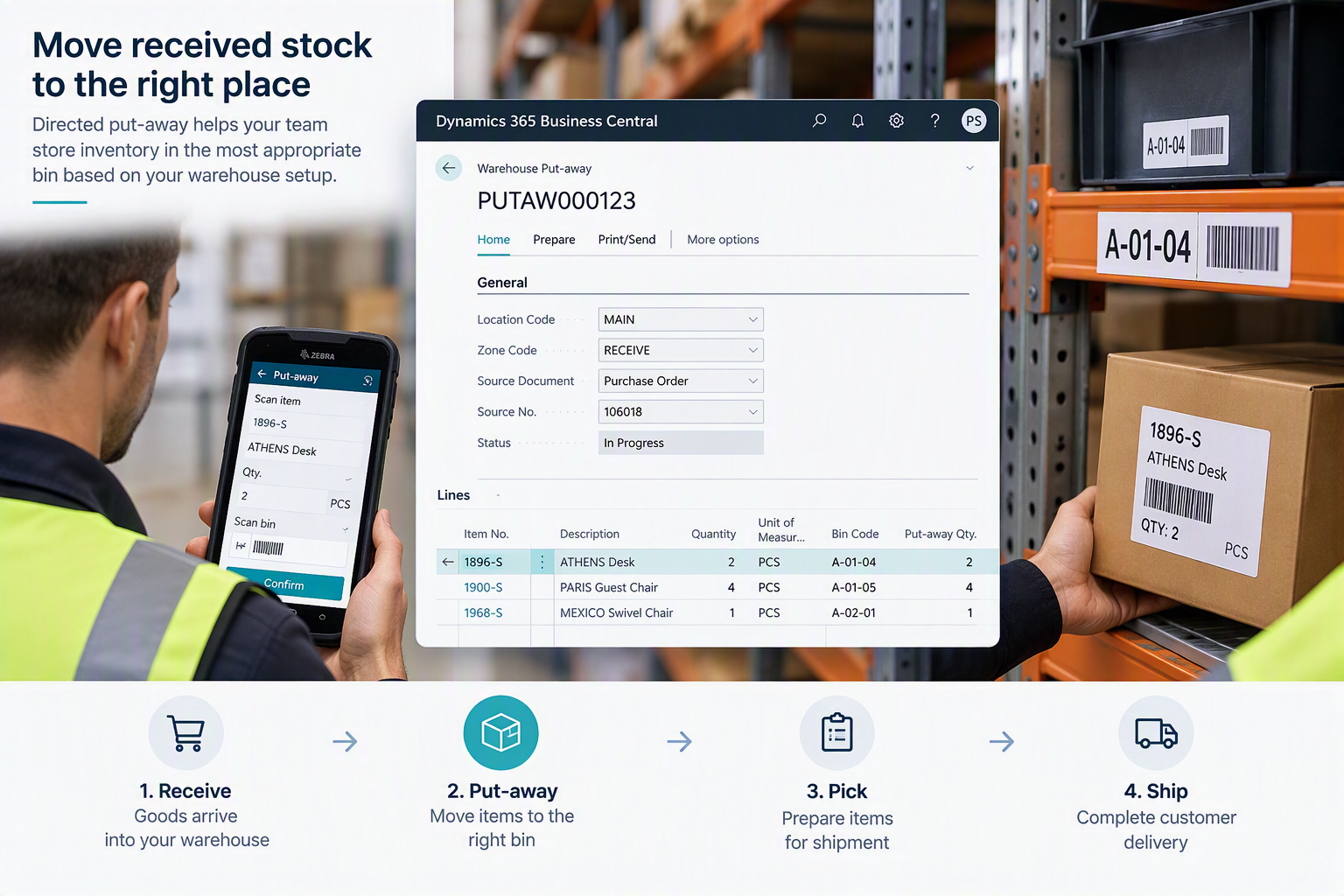
Move received stock to the right place
Receiving goods is only the beginning of the inbound warehouse process.
Business Central supports put-away processes for moving inventory into warehouse storage.
For more advanced warehouses using Directed Put-away and Pick, put-away templates can suggest an appropriate bin based on configured criteria including put-away templates, bin rankings and minimum and maximum quantities for fixed bins.
This gives you flexibility to design warehouse processes around the level of control your operation actually requires.
Structure your inbound warehouse process from receipt through to put-away.
WAREHOUSE PICKING
Create a more structured approach to order picking
Once an order is ready for fulfilment, warehouse teams need to identify the inventory required and prepare it for shipment.
Business Central supports multiple levels of picking, ranging from Inventory Picks through to Warehouse Picks in more advanced configurations.
This flexibility means your warehouse processes don't need to be unnecessarily complicated. The warehouse can be configured around the level of control the business requires.
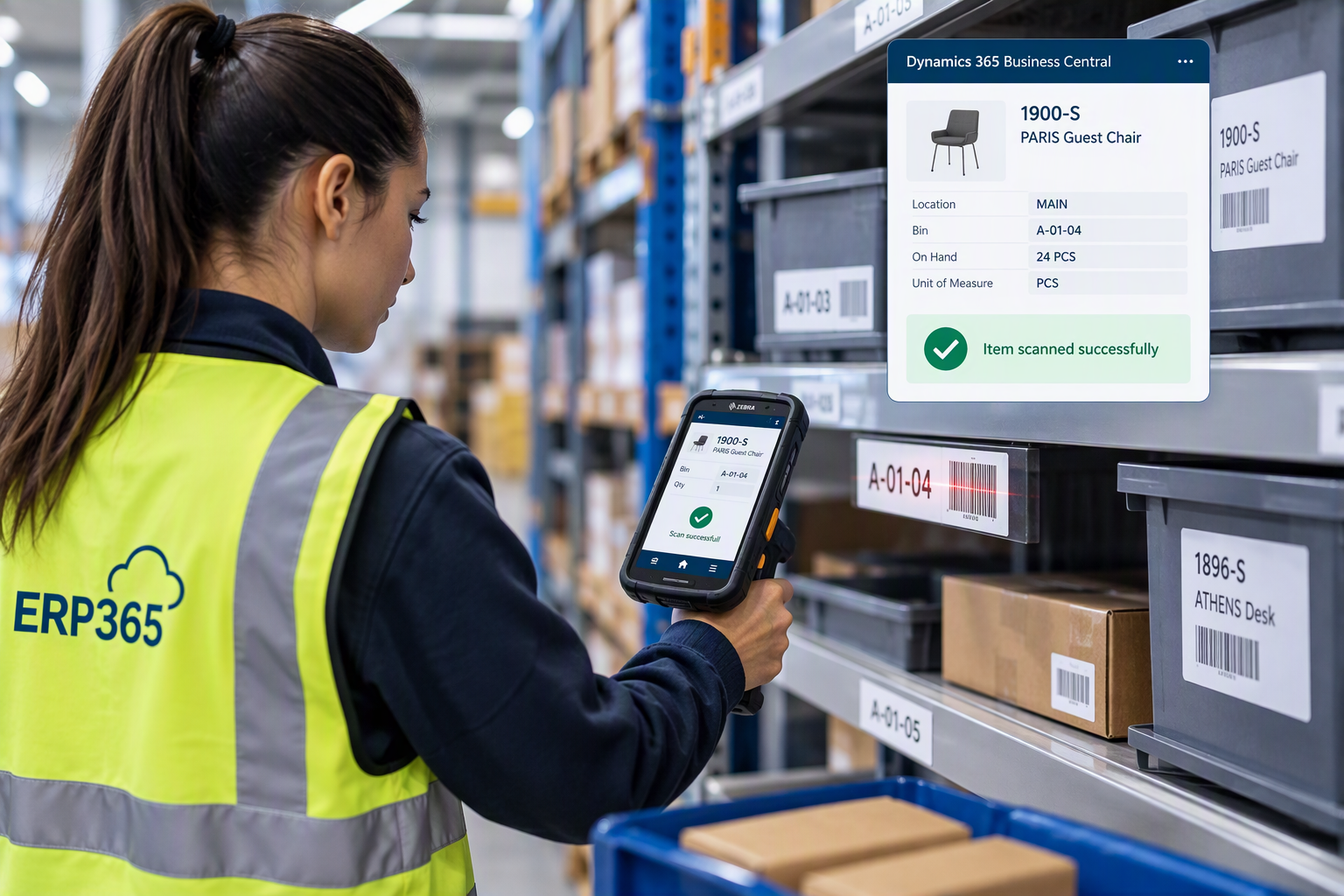
Use barcode-enabled picking to help warehouse teams identify the right items and bins while keeping warehouse activity connected with Business Central.
DIRECTED PUT-AWAY & PICK
Take warehouse control further
For more demanding warehouse environments, Business Central supports Directed Put-away and Pick.
This enables more advanced warehouse processes, including consolidated receive/ship posting and consolidated pick/put-away activities across multiple source documents.
Put-away templates can also be used to help determine suitable bins for inventory.
This gives growing distributors and manufacturers a pathway from relatively straightforward warehouse processes into a more controlled warehouse environment.
WAREHOUSE MOVEMENTS
Manage the movement of stock inside your warehouse
Inventory doesn't remain static after it has been received and put away.
Business Central includes functionality for handling inventory movement within warehouse processes, including inventory movements and movement worksheets depending on the warehouse configuration.
This helps maintain a connection between the physical movement of goods and the inventory information held in Business Central.
WAREHOUSE SHIPPING
Connect picking with customer fulfilment
The outbound warehouse process brings inventory management and sales fulfilment together.
Business Central can support outbound processes using sales orders and inventory picks in simpler environments, while more advanced warehouse configurations can use Warehouse Shipments together with separate warehouse picking activities.
This creates a connected flow:
Sales Order → Pick → Ship → Customer
BARCODE SCANNING
Reduce reliance on manual warehouse processes
Barcode technology can help connect physical inventory handling with your Business Central environment.
Business Central itself provides native barcode-scanning capabilities through its mobile application and AL, supporting compatible mobile-device cameras and dedicated Android-scanner scenarios.
For more advanced warehouse scanning requirements, ERP365 can combine Business Central with specialist mobile warehouse solutions.
MOBILE WAREHOUSE MANAGEMENT
Take Business Central onto the Warehouse Floor
Warehouse operations happen where your products are being received, stored, moved, picked, counted and shipped.
ERP365 can extend Microsoft Dynamics 365 Business Central with specialist mobile warehouse solutions that put barcode-driven Business Central processes into the hands of your warehouse team.
Whether you're looking to eliminate paper-based processes, improve inventory accuracy or introduce more advanced warehouse workflows, ERP365 can help you select a solution suited to your operation.
TASKLET MOBILE WMS
Mobile Warehouse Management Built for Business Central
Tasklet Mobile WMS is a mobile warehouse management solution designed specifically for organisations using Microsoft Dynamics 365 Business Central.
It connects warehouse workers with Business Central through mobile devices and barcode scanning, with transactions synchronised with the ERP. It also supports online and offline operation, which can be valuable in warehouse environments where connectivity is inconsistent.
Support your warehouse team with:
- Receiving and put-away
- Picking and shipping
- Inventory counting and adjustments
- Planned and unplanned movements
- Item and bin lookup
- Barcode scanning
- Label printing
- Production and assembly
- License plating
- Image capture

Work even when connectivity is limited
One of Tasklet Mobile WMS's particularly useful differentiators is its offline capability, allowing warehouse processes to continue in areas with limited connectivity.
WAREHOUSE INSIGHT BY INSIGHT WORKS
Barcode-Driven WMS for Business Central
Warehouse Insight from Insight Works brings mobile barcode scanning and warehouse management directly into the Business Central environment.
Warehouse transactions can post directly into Business Central in real time, with Insight Works describing the solution as operating without a separate database or middleware.
Warehouse Insight supports:
- Barcode-driven warehouse processes
- Mobile receiving
- Put-away
- Picking
- Inventory counting
- Real-time inventory updates
- Label printing
- Lot and serial number capture
- Production order processing
- Mobile warehouse devices

For more advanced warehouse operations, Warehouse Insight Advanced WMS also supports capabilities including directed warehouse picks, tote, wave and batch picking, licence plating, FIFO/FEFO lot picking and advanced inventory counting.
WHICH MOBILE WMS IS RIGHT FOR YOU?
Find the Right Fit for Your Warehouse
Every warehouse operates differently. ERP365 can help you assess Tasklet Mobile WMS and Warehouse Insight alongside your standard Business Central warehouse processes to determine which approach best fits your requirements.
Tasklet Mobile WMS
A strong option where you want a user-friendly mobile warehouse solution with extensive barcode-driven processes and the ability to continue working offline.
Warehouse Insight
A strong option where you want barcode-driven warehouse management integrated directly with Business Central, with real-time transaction processing and options for more advanced WMS functionality.
A WAREHOUSE THAT CAN GROW WITH YOU
Choose the Right Level of Warehouse Management for Your Business
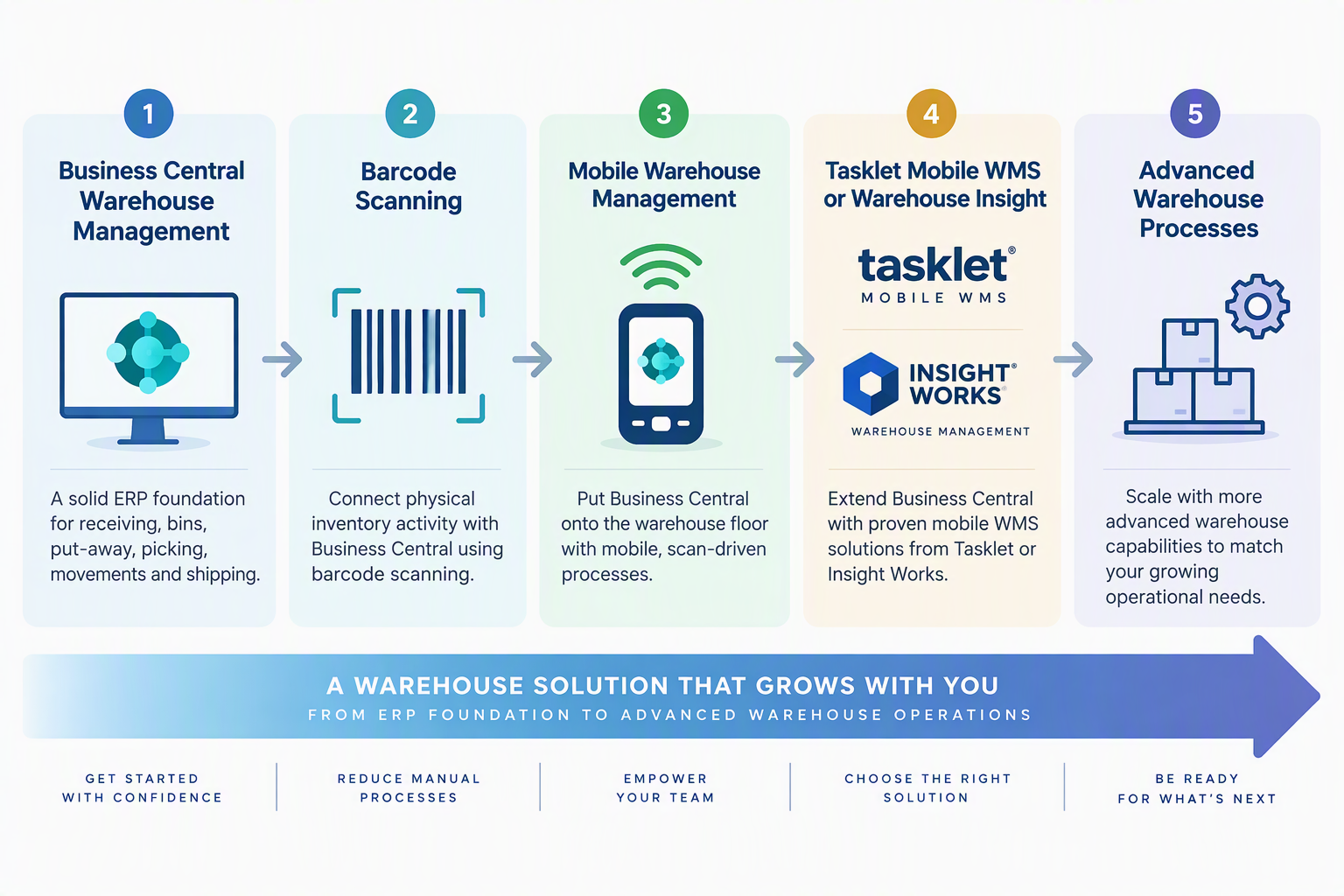
One of Business Central's strengths is that warehouse management doesn't have to be implemented at maximum complexity from day one.
Your warehouse requirements can change as order volumes grow, product ranges expand and operational processes become more complex.
Microsoft Dynamics 365 Business Central supports different levels of warehouse configuration, from relatively straightforward inventory and warehouse activities through to more advanced receiving, put-away, picking and shipping processes.
ERP365 can help you build around the level of control your warehouse needs today, with options to extend your Business Central environment as those requirements develop.
Start with standard Business Central Warehouse Management, introduce barcode-enabled processes where appropriate, and extend further with solutions such as Tasklet Mobile WMS or Warehouse Insight by Insight Works when you need more specialised mobile warehouse functionality.
WAREHOUSE + INVENTORY
Connect physical warehouse activity with inventory
Warehouse management and inventory management are closely related, but they're not the same thing.
Inventory management gives your organisation visibility and control over stock.
Warehouse management controls how that inventory is physically received, stored, moved, picked and shipped.
Business Central brings these areas together within the same ERP environment.
WAREHOUSE + MANUFACTURING
Connect warehouse processes with production
For manufacturers, warehouse activity doesn't stop at purchasing and customer shipments.
Materials also need to flow towards production while finished products need to return into inventory.
Business Central's warehouse configurations can support processes associated with production alongside purchasing, sales, service, transfers, assembly and projects.
This makes warehouse management an important connection point between your inventory and manufacturing operations.
Why Businesses Choose Business Central for Warehouse Management
Better Warehouse Visibility
Give your team greater visibility of inventory placement and warehouse activities.
Structured Receiving & Put-away
Create defined processes for handling incoming inventory and moving it into storage.
More Controlled Picking
Use pick processes appropriate to the complexity and requirements of your operation.
Connected Fulfilment
Connect warehouse processes with the sales transactions driving customer demand.
Flexible Warehouse Configuration
Business Central supports different levels of warehouse complexity, enabling organisations to choose warehouse processes appropriate to their requirements.
Mobile Extensibility
Extend Business Central with specialised Mobile WMS and scanning capabilities when your warehouse requires them.
Business Central Warehouse Management for New Zealand and Australian businesses
ERP365 helps New Zealand and Australian manufacturers, distributors and other inventory-based businesses bring warehouse management into their Microsoft Dynamics 365 Business Central environment.
Getting warehouse management right isn't simply about introducing more processes.
The goal is to find the right balance between inventory accuracy, warehouse control and efficient movement of goods.
ERP365 can help configure Business Central around your warehouse processes and extend the solution with mobile scanning and specialist WMS capabilities where required.
Extend Your Business Central Warehouse
Tasklet Mobile WMS
Mobile barcode-driven warehouse management with online and offline capabilities.
Warehouse Insight by Insight Works
Barcode-driven warehouse management with real-time integration into Business Central.
Inventory Planning
Improve visibility of requirements before inventory reaches the warehouse.
Barcode Generation
Create barcode labels to support your inventory and warehouse processes.
Is Business Central Warehouse Management Right for Your Business?
Business Central Warehouse Management may be a good fit if you need to:
Manage receiving and shipping
Introduce structured put-away processes
Manage internal stock movements
Connect picking and shipping with sales orders
Introduce mobile or barcode-enabled warehouse processes
Track inventory using bins
Improve warehouse picking
Connect warehouse operations with purchasing
Support manufacturing warehouse processes
Scale from simpler to more advanced warehouse requirements
FREQUENTLY ASKED QUESTIONS
Yes. Microsoft Dynamics 365 Business Central includes warehouse management functionality that extends inventory management with capabilities including bins, Warehouse Shipments, Inventory Picks and Movement Worksheets.
Business Central supports different warehouse configuration levels, allowing businesses to select processes appropriate to the complexity of their operations.
Ready to create a smarter warehouse?
Talk to ERP365 about designing a warehouse management solution that matches your operational requirements today and can extend into mobile scanning and more advanced WMS processes as your business grows.