
Microsoft Dynamics 365 Business Central Project Management
Business Central Core Function
Successful and profitable projects start with better planning, resource management and financial visibility.
Microsoft Dynamics 365 Business Central brings project planning, resourcing, time tracking, budgeting, costing, billing and accounting together within your ERP environment.
Manage project tasks, schedule resources, track employee and machine hours, monitor budgets and gain greater visibility of project progress and financial performance.
Manage projects from planning through to billing
Successful project management requires more than managing tasks and deadlines.
You also need to understand the resources being used, hours worked, costs incurred, what's been billed and how the project is tracking financially.
Business Central connects operational project management with project accounting, giving project managers visibility across projects, employees, machinery and other resources.
This creates a stronger connection between project delivery and financial performance.
CORE BUSINESS CENTRAL PROJECT MANAGEMENT FUNCTIONS
Project Planning
Build a strong foundation for every project
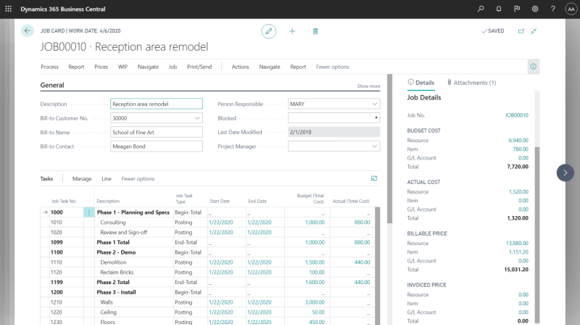
Create projects, define project tasks and prepare project planning lines within Business Central.
Bring project plans together with the resource, cost and financial information required to manage delivery.
Use Business Central Projects to:
- Create and structure projects
- Define project tasks
- Create project planning lines
- Allocate resources
- Establish project budgets
- Record project usage
- Monitor progress
- Invoice customers
This gives your project and finance teams a shared environment for managing projects from planning through to completion.
PROJECT BUDGETING & COSTING
Keep project costs and budgets under control
Knowing whether a project is progressing is important. Knowing whether it's progressing profitably is even more valuable.
Business Central enables organisations to budget for resources and compare actual item and resource usage with budgeted usage. Microsoft notes that this comparison can help improve the quality and cost efficiency of future projects.
Connect project activity with financial information to gain greater visibility over:
- Project budgets
- Resource costs
- Item usage
- Project expenses
- Actual versus budgeted usage
- Work in progress
- Project financial performance
TIME TRACKING
Connect timesheets directly to your projects
Accurate time recording is critical for understanding project costs and maintaining reliable project financial information.
Business Central supports timesheets for tracking employee and machine hours against projects. Time sheets can work with project tasks and planning lines, with time subsequently posted to a project journal.
This allows project activity and resource usage to become part of your wider Business Central environment rather than being maintained in separate systems.
PROJECT FINANCIALS
Connect project delivery with financial management
One of the biggest advantages of managing projects within an ERP platform is the connection between operational activity and financial information.
Business Central supports project supplies, resource and item usage, project expenses, work in progress and customer invoicing.
Manage Work in Progress
Business Central supports WIP management for projects. Microsoft notes that monitoring WIP helps maintain correct financial statements and estimate the financial value of ongoing projects.
Invoice Your Customers
Customer invoicing can be managed when the project is completed or according to an invoicing schedule.
This provides a clearer connection between:
Project → Resources → Time & Costs → WIP → Billing → Finance
PROJECT ANALYTICS
Turn project information into better decisions
Managing a project successfully requires visibility into what's happening now, not simply reviewing the numbers after completion.
Business Central provides project analytics capabilities including built-in reports and the Power BI Projects app for analysing and monitoring project KPIs.
Managers can use connected project information to better understand project progress, budgets, resource usage and financial performance.
See Project Performance at a Glance
Bring project information together with Power BI to gain greater visibility of project performance and KPIs.
Why Businesses Choose Business Central for Project Management
Better Project Visibility
Bring inventory and the processes affecting it together within your Business Central environment.
Stronger Cost Control
Connect inventory with purchasing, sales, warehousing, manufacturing and financial information.
Better Resource Management
Extend inventory processes towards mobile users and scanning devices. Business Central's barcode capabilities support scenarios using mobile-device cameras and dedicated Android barcode scanners.
Connected Timesheets
Build an inventory management platform that can be extended as product volumes, locations and operational requirements become more complex.
Project Financial Visibility
Use connected supply-and-demand information as the foundation for more informed inventory planning.
Business Central Project Management for New Zealand and Australian businesses
ERP365 helps New Zealand and Australian organisations bring project management and financial management together with Microsoft Dynamics 365 Business Central.
Effective project management isn't simply about completing work on time. You also need visibility of resources, time, costs, budgets, billing and financial performance.
ERP365 can help configure Business Central around your project processes, giving operational and financial teams a more connected view of project delivery.
How Business Central Projects Connect Across Your Business
Financial Management
Connect project costs, WIP, invoicing and accounting with your wider financial management processes.
Business Intelligence
Use Business Central reporting and Power BI project analytics to gain greater insight into project KPIs and performance.
Purchasing
Purchase supplies for projects and connect project-related purchasing with your procurement processes. Business Central supports purchasing project supplies through purchase orders or invoices.
Resource Management
Bring employee, machine and other resource information into your project planning and costing processes.
Is Business Central Project Management Right for Your Business?
Business Central may be a good fit if your organisation needs to:
Manage projects and project tasks
Track employee and machine time
Track item and resource usage
Manage project work in progress
Connect projects to financial management
Create and monitor project budgets
Manage project resources
Monitor project costs
Invoice customers for project work
Gain better visibility of project performance
FREQUENTLY ASKED QUESTIONS
Yes. Microsoft Dynamics 365 Business Central includes project management and project accounting capabilities. Businesses can create projects and project tasks, schedule resources, maintain budgets, track employee and machine hours using timesheets, monitor progress and manage project financial information.
Ready to gain greater control of your projects?
Talk to ERP365 about using Business Central to create a more connected approach to managing projects and project financial performance.