
Microsoft Dynamics 365 Business Central Sales Management
Business Central Core Function
Boost sales. Deliver better customer experiences. Build stronger relationships.
Build stronger customer relationships and connect your entire sales process with your business operations.
Microsoft Dynamics 365 Business Central brings customers, sales, orders, inventory and financial information together within one connected business management platform.
Give your sales team access to the information they need to respond to customers, manage sales processes and collaborate using familiar Microsoft tools including Outlook and Teams.
And when you need more advanced CRM capabilities, Business Central can connect with Dynamics 365 Sales to extend the customer journey.
Connect sales with the rest of your business
A successful sale doesn't happen in isolation.
Your sales team needs access to customer information, products, pricing and availability, while your operational teams need visibility of incoming customer demand.
Business Central brings these processes together, helping create a connected flow between:
Customer → Quote → Order → Fulfilment → Invoice → Finance
Instead of maintaining sales information across disconnected systems and spreadsheets, your teams can work with connected business information.
CORE BUSINESS CENTRAL SALES FUNCTIONS
Customer Management
Keep customer information connected
Bring customer information together with the sales, order and financial processes surrounding each relationship.
Business Central helps create a shared source of information so sales, customer service, operations and finance teams can work within a connected business environment.
That means customer-facing teams can have greater context when dealing with enquiries and ongoing customer requirements.
SALES QUOTES & ORDERS
Move from opportunity to order with less friction
Create sales quotes and convert customer demand into sales orders while keeping sales activity connected with the operational side of your business.
Bring together information such as:
- Customers
- Products and services
- Sales pricing
- Discounts
- Inventory
- Orders
- Shipments
- Invoicing
This creates a joined-up sales process rather than treating sales administration as a separate activity from inventory, fulfilment and finance.
BUSINESS CENTRAL + OUTLOOK
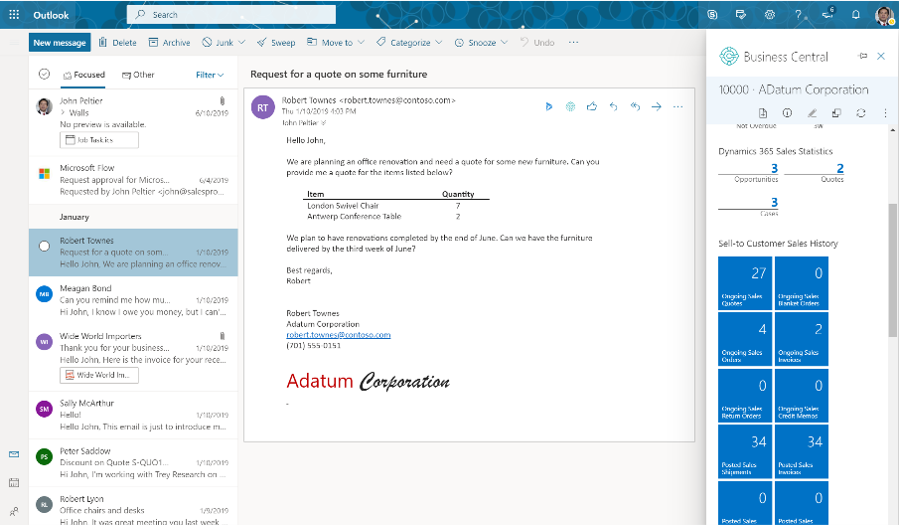
Manage customer activity while working in Outlook
One of Business Central's strengths is its connection with the Microsoft applications people already use.
Business Central's integration with Outlook, Excel and Teams reduces application switching and data entry.
For your sales team, this means bringing Business Central information closer to customer conversations rather than constantly moving between applications.
Work with Business Central and Microsoft 365
Discover how Business Central works alongside the Microsoft tools your team already uses.
COPILOT FOR SALES & PRODUCT CONTENT
Create better product descriptions with Copilot
Copilot in Business Central can help create product descriptions based on product attributes such as colour, material and size.
Users can adjust tone of voice, format and the qualities they want to emphasise before using Business Central's Shopify integration to publish products to an online store.
For businesses managing significant product catalogues, this provides another way AI can assist with repetitive content creation while keeping the process connected with product information already held in Business Central.
SALES & ECOMMERCE
Connect Business Central with DynamicWeb
Extend your sales channels with DynamicWeb ecommerce integrated with Microsoft Dynamics 365 Business Central.
Create a connected digital commerce experience where your ecommerce platform and ERP work together, helping customers interact with your business online while Business Central remains at the heart of your operational processes.
For businesses looking to grow B2B or B2C online sales, ERP365 can help bring DynamicWeb and Business Central together as part of a more connected sales environment.
Benefits:
- Create a connected ecommerce and ERP environment
- Support B2B and B2C digital sales strategies
- Bring online sales closer to your Business Central processes
- Reduce reliance on disconnected ecommerce and ERP systems
- Build a scalable digital sales channel around Business Central
FROM SALES TO SERVICE
Build relationships beyond the initial sale
A strong customer relationship doesn't finish when an order is completed.
Business Central can support the transition from sales to ongoing service, including customer returns and repairs and service agreements. Microsoft positions these connected service operations as part of Business Central's broader sales and service capability.
This gives customer-facing teams a more connected view of the relationship and helps keep sales, service and operational information together.
INVENTORY REPLENISHMENT
Turn sales information into better decisions
Connected sales data is valuable when you can use it to understand what's happening across your business.
Business Central provides dashboards, reporting and analytical capabilities, with Microsoft highlighting real-time dashboards, flexible reports, KPIs and connections with Excel and Microsoft Power BI.
This can give decision-makers a clearer picture of sales activity alongside the operational and financial information held in Business Central.
See Sales Performance at a Glance
Why Businesses Choose Business Central for Sales Management
Connected Customer Information
Bring customer, sales, order and financial information together in your Business Central environment.
Streamlined Sales Processes
Create a more connected journey from customer demand and sales orders through fulfilment and invoicing.
AI-Assisted Product Content
Use Copilot to help create product descriptions using existing product attributes, with options to tailor tone, format and emphasis.
Connected Sales & Service
Keep the relationship going beyond the initial sale with connected service processes such as returns, repairs and service agreements.
Familiar Microsoft Tools
Business Central works with Microsoft 365 applications including Outlook, Excel and Teams.
Extend Business Central with Dynamics 365 Sales
As your sales requirements become more sophisticated, ERP365 can help connect Business Central with Microsoft Dynamics 365 Sales.
This creates a natural progression from ERP and sales order management into more advanced CRM and sales capabilities.
For organisations looking to extend the customer journey further, the Microsoft Dynamics 365 ecosystem also includes Dynamics 365 Customer Service and Dynamics 365 Field Service. Microsoft explicitly positions these as options for elevating the Business Central customer experience.
Business Central Sales Management for New Zealand and Australian businesses
ERP365 helps New Zealand and Australian businesses connect sales with the operational and financial processes that ultimately deliver the customer experience.
It's not simply about recording an order. Pricing, inventory, purchasing, fulfilment, invoicing, customer service and financial information all need to work together.
ERP365 can help you build a Business Central sales environment around the way your business sells and then extend it with Microsoft 365, eCommerce, Copilot and Dynamics 365 when your requirements grow.
How Business Central Sales Connects Across Your Business
Inventory Management
Give sales processes a connection to inventory information and the wider supply chain.
Financial Management
Connect sales invoicing and customer activity with your wider financial processes.
Service Management
Continue the customer relationship with connected service operations.
Copilot
Bring Microsoft AI capabilities into Business Central to assist with tasks such as product marketing text.
Is Business Central Sales Management Right for Your Business?
Business Central may be a good fit if your organisation needs to:
Bring customers and sales information together
Connect sales with inventory and fulfilment
Work with Business Central alongside Microsoft 365
Connect online selling through eCommerce
Improve visibility of sales information
Manage sales quotes and orders
Connect sales and financial management
Introduce AI-assisted product content
Connect sales and service processes
Create a foundation that can extend into Dynamics 365 CRM
FREQUENTLY ASKED QUESTIONS
Yes. Microsoft Dynamics 365 Business Central provides sales functionality within the same business management platform used for areas such as inventory and finance. Business Central helps organisations boost sales and service while connecting sales-related processes with wider business operations.
Ready to create a more connected sales process?
Talk to ERP365 about using Business Central to streamline your sales processes, improve visibility and create a connected foundation for long-term customer relationships.